Input Menu
Manage Product Information in the VMI System
The Input Menu is a key part of the VMI (Vendor Managed Inventory) system, designed to allow suppliers to independently manage product-related data with Villa Market. This includes operations such as new product submission, price adjustments, promotions, notifying out-of-stock items, and product cancellations.
This module enhances efficiency, transparency, and reduces the reliance on physical documents or email communication between suppliers and Villa Market.
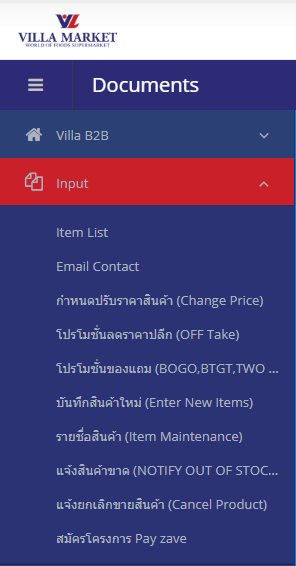
🔹 ฟังก์ชันหลักในหมวด Input
Item List
Displays all products in the system, including product codes, packaging units, cost, historical sales value, and selling status.
Email Contact
Shows email contact information for system-related personnel, such as administrators or purchasing staff.
Change Price
Used to propose new consignment selling prices to Villa Market, with the ability to specify the effective date.
OFF Take Promotion
Used to record temporary retail discount promotions to support sales during specific periods.
BOGO / BTGT / TWO FREE ONE Promotion
Used to set up “Buy X Get Y” or “Buy 2 Get 1 Free” promotions, allowing the system to calculate sales and free items automatically.
Enter New Items
Used to submit new products for Villa Market's approval by providing product details such as size, barcode, supplier, sales units, etc.
Item Maintenance
Displays all products belonging to the supplier in the system. Data can be printed or exported to Excel.
Notify Out of Stock
Used to inform Villa Market that a product is temporarily unavailable or cannot be supplied, with the option to specify when it will be available again.
Cancel Product
Used to request discontinuation of specific products, with the ability to provide reasons and additional details.
Register for PayZave Program
For suppliers who wish to join Villa Market’s PayZave early-payment financial program.
🔹 Main Functions in the Input Menu
The Input menu covers essential product management functions, including:
Enter New Items — Submit new products for approval
Item Maintenance — View and manage existing product lists
Change Price / Promotion — Adjust retail or cost prices and manage promotional programs
Notify Out of Stock — Notify Villa Market when products are temporarily unavailable
Cancel Product — Request discontinuation of a product
🔹 Purpose of the Input Menu
🛒 Self-managed product data
Suppliers can add, edit, or update product information directly in the system without paperwork.
🔁 Reduce approval steps and processing time
All updates are recorded and visible in real-time, allowing faster review and approval.
📊 Standardized data shared with Villa Market
Ensures accurate product information for purchasing, distribution, and sales analysis.
⚙️ End-to-end process support
From new product entry → price adjustment → promotions → out-of-stock notification → product cancellation.
🔹 Workflow Structure of the Input System
💡 The Input module covers the entire lifecycle of a product in the VMI system — from introduction to adjustments, promotions, and eventual discontinuation.
🔹 Benefits for Suppliers
✅ Manage all product-related tasks in one centralized location
✅ Reduce redundant paperwork and email communication with the Purchasing team
✅ Improve accuracy and consistency of product data in the central system
✅ Easily update pricing, promotions, and product availability
🔹 Summary
The Input Menu is an essential tool for suppliers within the Villa Market VMI system. It enables efficient, transparent, and standardized product management, with every step stored in the central database for easy tracking, verification, and processing by both Villa Market and the supplier.
Last updated