Debt Report
Outstanding Invoice Notification
The Debt Report menu is used to view outstanding invoices from Villa Market to the Supplier. This includes the latest (new) invoice notices as well as all historical outstanding invoices stored in the system.
The report supports PDF viewing/printing and Excel export, making it convenient for accounting review and reconciliation.
🔹 Purpose of the Debt Report Menu
Review outstanding consignment invoice notices from Villa Market
Display the status of invoices that are pending payment or under verification
Provide official data for payment processing by the Supplier
Allow export/download of debt information for accounting and auditing
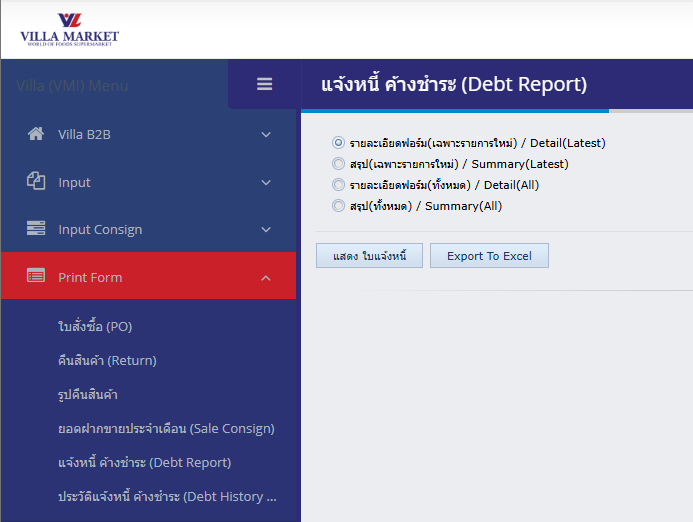
🔹 How to Use
Log in to the VMI system
Navigate to: Print Form → Debt Report
The Debt Report interface will appear
Select the report format from the following options:
Report Options
Detail (Latest)
Shows only the most recent invoice notice(s)
Summary (Latest)
Shows a summarized total for the latest invoice cycle
Detail (All)
Displays all invoice notices, both new and historical
Summary (All)
Shows the summarized amounts of all invoice notice records
After selecting the report type, choose one of the actions:
Available Actions
🧾 Show Invoice – Opens the report as a PDF in a new browser tab for printing or downloading
📊 Export to Excel – Downloads the report as an .xlsx file for further processing
🔹 Benefits of the Debt Report
Quick review of outstanding invoices
Transparent historical tracking of all invoice notices
Supports both PDF print and Excel export
Useful for both Supplier accounting teams and Villa Market finance
Helps reduce errors in payment reconciliation
💡 Notes
For up-to-date information, select Latest options
To review multiple cycles or historical debt, choose All
PDF formats are intended as official documents for accounting and audits
Last updated