Debt History Report

Debt History Report

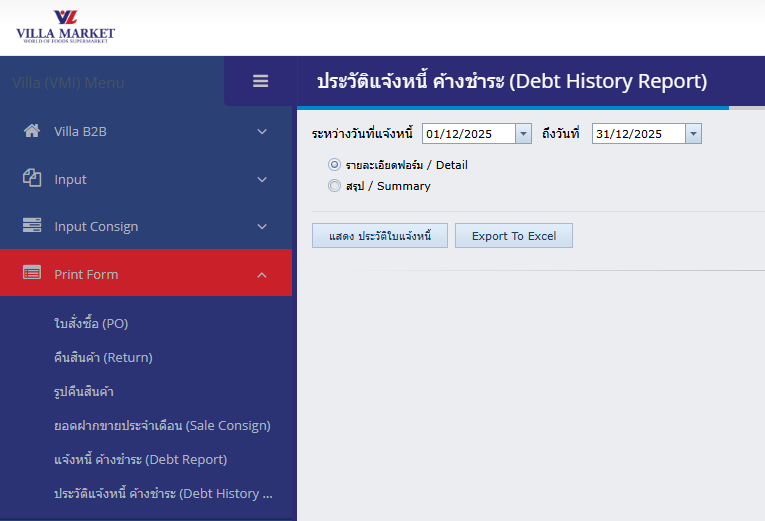
The Debt History Report menu is used to review the complete history of invoice notices issued to a Supplier. Users can search by date range, view detailed or summarized reports, and export the information for accounting and auditing purposes.

The system supports both PDF output and Excel export, making it convenient for review and record-keeping.


πŸ”Ή Purpose of the Debt History Report

  • Review all historical invoice notices within a selected date range

  • Check past invoices, whether they were paid or remain outstanding

  • Provide official reference data for accounting reconciliation

  • Download summary or detailed reports for further processing


πŸ”Ή How to Use

  1. Log in to the VMI system

  2. Navigate to: Print Form β†’ Debt History Report

  3. The report screen will appear

Step 1 β€” Select Date Range

Set the Start Date and End Date to filter invoice history within the desired period.

Step 2 β€” Select Report Type

Report Type
Description

Detail

Displays every invoice record within the selected date range

Summary

Shows summarized totals for the selected period

Step 3 β€” Choose Output Format

Action
Description

🧾 Show Invoice History (PDF)

Opens a PDF in a new tab β€” ready for printing

πŸ“Š Export to Excel (.xlsx)

Downloads the invoice history as an Excel file


πŸ”Ή Benefits of the Debt History Report

  • Comprehensive historical review for all invoice notices

  • Supports both summary and detailed levels of reporting

  • Easy to use, suitable for accounting, finance teams, and suppliers

  • Supports PDF printing and Excel export

  • Helps improve transparency and accuracy in financial reconciliation


πŸ’‘ Notes

  • If the selected date range contains large amounts of data, loading may take longer

  • For faster results, choose a shorter date period

  • Exported Excel files can be used for data analysis or long-term archiving


Last updated