Daily Consign Receive Report
Daily Consignment Receiving & Returning Report
The Daily Consign Receive Report is used to review the daily receiving and returning transactions of consignment products. The report is displayed in an interactive Pivot Table format, allowing users to sort, filter, group, analyze, and export the data with ease.
🔹 Report Page Overview
Users can select the desired date range to display daily consignment movements. The system will generate a Pivot-style data table similar to the Stock Card report.
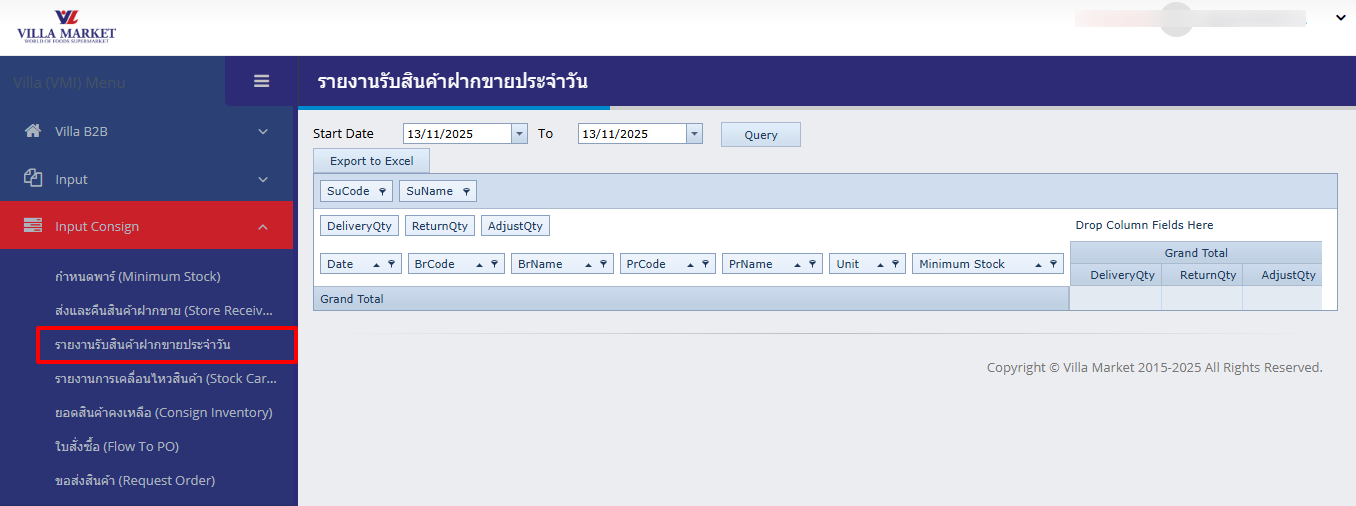
🖥️ Report Screen Components
Start Date / To
Select the start and end date for the report.
Query
Retrieves data according to the selected date range.
Export to Excel
Exports the current pivot view into an .xlsx file.
Pivot Field Area
Drag-and-drop area for customizing the report layout.
Drop Column Fields Here
Section for defining column grouping in the Pivot Table.
🔧 Main Features
1. Drag & Drop Fields
Users can drag fields into Rows, Columns, or Values to customize their report layout. Common fields include:
Branch
Product
Date
DeliveryQty
ReturnQty
AdjustQty
2. Filter (Filtering Options)
Click the filter icon on any column to narrow down the data:
Show data for a specific branch
Show specific product groups or brands
Filter by specific date or transaction type
3. Expand / Collapse Groups
Users can expand or collapse groups within the Pivot Table such as:
View totals at the branch level
Expand to show item-level details
4. Sorting
Sort any column A → Z or Z → A, including:
Product Name
Delivery Quantity
Return Quantity
Branch Name
Date
5. Export
After customizing the Pivot view, users can click Export to Excel to download the report exactly as shown.
🔹 Data Fields Displayed in the Report
SuCode / SuName
Supplier code and supplier name
BrCode / BrName
Branch code and branch name
PrCode / PrName
Product code and product name
Unit
Unit of measurement
Minimum Stock
Minimum stock level for the product
DeliveryQty
Quantity delivered to the branch on that day
ReturnQty
Quantity returned from the branch
AdjustQty
Adjusted quantity for stock correction
Grand Total
Total quantities depending on selected Pivot configuration
⚙️ System Limitations
Date Range
Recommended date range is no longer than 1 month to ensure smooth data processing. Large data ranges may slow performance.
Loading Time
Every Pivot change (filtering, grouping, sorting) requires data re-structuring, which may take time depending on data size.
Heavy Data Volume
Reports with many SKUs and many branches may take longer to load or export.
📘 Summary
The Daily Consign Receive Report is designed to help suppliers and Villa Market purchasing teams efficiently monitor daily consignment product movements. With its flexible Pivot Table format, users can:
Analyze daily deliveries and returns
Identify stock issues
Review branch-level product movement
Export data for reconciliation and planning
✅ Ideal for confirming daily movement before billing, replenishing stock, or preparing replenishment actions.
Last updated